
DIVI 5 MODULE · RECIPE CARD
RecipeCard: a recipe card that looks like your site
A Divi 5 recipe card module for food bloggers. Readers switch between US and metric, scale the servings, print a clean copy and leave a star rating, and Google gets the recipe data it needs without any extra setup.
REQUIRES DIVI 5, SOLD SEPARATELY. GET IT HERE

BUILT NATIVELY IN DIVI 5 · US AND METRIC · GOOGLE RECIPE DATA · FULL DOCUMENTATION
WHO IT'S FOR
Made for food bloggers on Divi 5
A recipe post has two jobs: to look good enough that people want to cook, and to work well enough that they can. Most recipe card plugins manage the second and ignore the first, so you end up fighting their styles to make the card match your site. RecipeCard is a native Divi 5 module, so it picks up your fonts and buttons, and its colours are set from the Design tab like any other module.
Looks like your site
The card uses your Divi fonts and buttons, and eight colour settings under Design match it to your palette. There's no stylesheet to override.
Made to cook from
US or metric with one tap, servings that rescale every amount, grouped ingredients and a numbered method, all easy to read on a phone propped up in the kitchen.
Found and trusted
Recipe data Google can read is written for you, and star ratings from your readers build up on the card over time.
AT A GLANCE
Everything a recipe post needs
Two Divi 5 modules: the Recipe Card itself, and Recipe Jump Buttons for the top of the post. Every image on this page is the plugin at work on the Nicole demo, with real recipes and real photography.

FEATURES
Built for the way people cook
US or metric, for any number of servings
Write your US amounts and, if you like, a metric set alongside them. Readers switch with one tap, and the plus and minus buttons rescale every amount in the list, so a recipe for two becomes a recipe for six without anyone reaching for a calculator.
Ingredients can be grouped, for example "For the rösti" and "For the herb oil", and the numbered method has a notes panel underneath for tips and swaps.

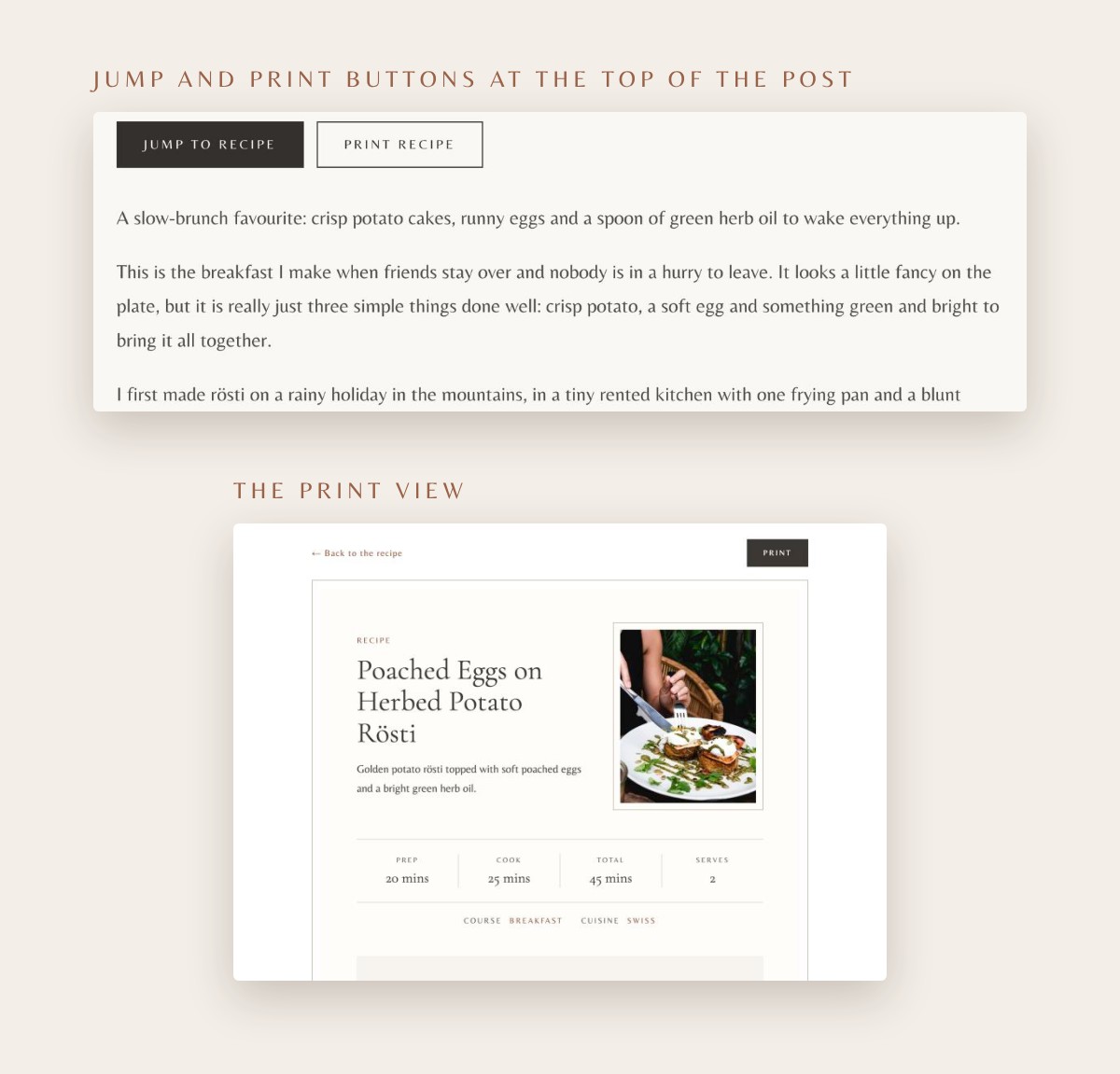
Jump to the recipe, or print it
Add the Recipe Jump Buttons module near the top of the post and readers can skip straight to the card, or print it without scrolling at all.
Print Recipe opens a tidy print view in your site's colours, and it keeps the units and servings the reader picked, so what comes out of the printer is what they're actually cooking.
Star ratings
A "Made this recipe?" prompt at the foot of the card sends readers to the comments to choose a star rating. The average shows on the card under the recipe name.
Google recipe data
Every card writes recipe schema for you: times, servings, category, cuisine, ingredients, method steps and the average rating. There's nothing extra to fill in.
Made for phones
The card stacks neatly on small screens, so readers can cook straight from their phone without pinching and zooming.
Built properly
Native Divi 5 modules, no shortcodes and no other plugins to install. Front-end text is translation ready with a .pot file included, and the plugin is GPL licensed.
MAKE IT YOURS
Styled like any other Divi module
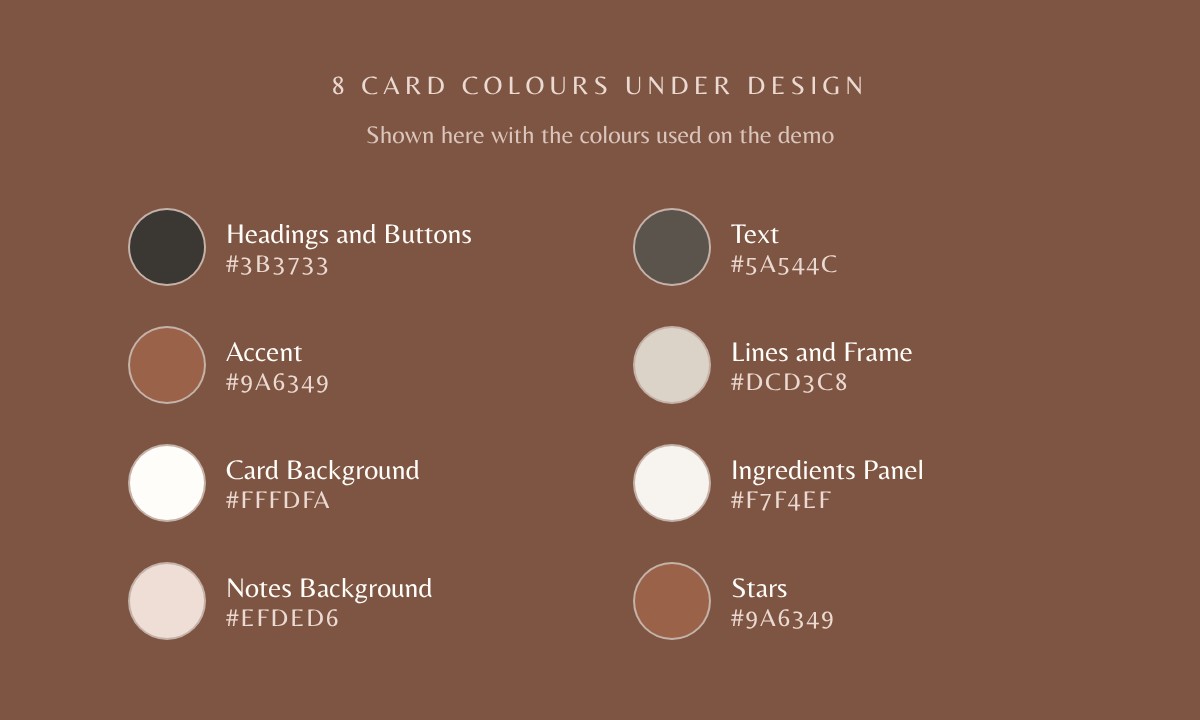
RecipeCard is styled from the Design tab, the same way you style the rest of your Divi 5 site, so there's no separate settings screen and no stylesheet to fight.
- Colours: eight card colours for headings and buttons, text, accent, lines and frame, card background, ingredients panel, notes background and stars.
- Fonts: set the recipe name, heading and body fonts, or leave them to follow your global fonts.
- Buttons: style the Print, Pin and Rating buttons to match the rest of your site.
- Presets: save your styling as a Divi preset so every new recipe card starts out looking right.
WHAT'S INCLUDED
What you get and what you need
What you get
- recipe-card-for-divi.zip: the plugin, installed from Plugins › Add New › Upload Plugin
- Recipe Card module: name, summary, photo, prep, cook and total times, servings, course and cuisine, grouped ingredients in US units with an optional metric set, a numbered method and notes
- Recipe Jump Buttons module: Jump to Recipe and Print Recipe for the top of the post
- Print view, Pin button, star ratings and Google recipe data, all built in
- Step-by-step documentation
- One year of updates, then $14.50 a year (auto-renews; cancel any time)
- A licence for one website
- Support by ticket, from the support page
What you need
- WordPress 6.5 or later
- PHP 7.4 or later
- Divi 5, installed and active
About the images: RecipeCard includes no photographs. The card uses the photos you add to your own posts; the food photography on this page is from the Nicole demo and is shown for preview only.
You'll need Divi itself
RecipeCard is a Divi 5 module, so you'll need Divi itself. If you don't have it yet, you can get it from Elegant Themes.
THAT IS AN AFFILIATE LINK. IF YOU BUY THROUGH IT, ELEGANT THEMES PAYS ME A COMMISSION AT NO EXTRA COST TO YOU.
PRICING
One price, every feature
RecipeCard
$29
- Both Divi 5 modules: Recipe Card and Recipe Jump Buttons
- Instant download after payment
- One website licence
- One year of updates
- Support by ticket, from the support page
Renews at $14.50 a year for continued updates and support. Cancel any time from your account.
Starting a food blog from scratch? Nicole, our Divi 5 food blog theme, comes with RecipeCard included free.
FAQ
Questions before you buy
Is Divi included?
No. RecipeCard is a module for Divi 5, so you'll need Divi installed and active. You can get it from Elegant Themes using the link above.
Does it work with Divi 4?
No. RecipeCard is built natively for Divi 5 and won't run on Divi 4.
Will it work with my Divi theme?
Yes. RecipeCard works on any Divi 5 site, including child themes, and picks up your global fonts and buttons. It doesn't need any other plugins.
Does it come with food photos?
No. The card uses the photos you add to your own posts. The photography on this page is from the Nicole demo and is for preview only.
Can I use RecipeCard on a client's website?
Yes. Each licence covers one website, whether it's your own or a client's. For a second site, buy a second licence.
How do updates work?
Your licence includes a year of updates and help. Activate your licence key in your WordPress dashboard and new versions of RecipeCard will appear with your other updates, ready to install in one click.
What happens after the first year?
Your licence renews automatically at $14.50 a year, half the original price, which keeps updates and help coming as Divi, WordPress and PHP change. If you'd rather not renew, you can cancel any time from your account. You keep the version of RecipeCard you have and can carry on using it, but it won't receive any further updates or help, so future versions of Divi, WordPress or PHP may eventually stop parts of it working as intended.
I've bought Nicole. Do I need RecipeCard too?
No. RecipeCard comes free with the Nicole child theme. [TBC: how RecipeCard updates are licensed for Nicole buyers]
How do I get help?
The documentation covers installing the plugin, adding a recipe, ingredients and method, styling the card, the Jump and Print buttons, star ratings and the print view. If you're still stuck, open a ticket and I'll reply within one or two working days.
What if RecipeCard isn't right for me?
[TBC: refund answer and link to Terms & refunds once the policy is written]
Ready to give your recipes a proper card?
Add RecipeCard to your Divi 5 site and spend your time on the recipes, not on styling plugins.